Data Group Properties
Each data group accessed by means of the Data Group page in a remote device editor of the Device Definition Service (DDS) has a set of properties. These properties appear in a Data Group Properties dialog box. Most of the properties found there are common to all CygNet data groups; however, many data groups have unique properties.
For information about properties specific to a single data group (like ordinal numbers or advanced configurations options), see documentation about that specific data group within the data group's specific remote device subsection.
See also Data Group Page.
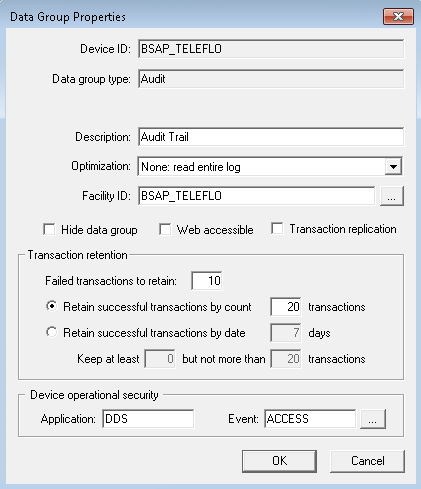
|
| Sample Data Group Properties Dialog Box |
Data Group Properties
The following table lists and describes the fields found on the Data Group Properties dialog box.
| Property | Description |
|---|---|
| General | |
|
Device ID |
The name of the remote device to which this data group belongs. |
|
Data group type |
The name of the data group as it appears in the remote device editor default data groups field (Data Group Type), Select Data Group to Add dialog box, or corresponding device template file. |
|
Description |
Additional description field beyond the Data Group Type field. The field is free-form. |
|
Select this option to optimize audit record retrieval by the BSAP EIE. By default the EIE will read the entire audit log. Alternately you can configure the data group to read and purge the audit log to implement a Get Latest retrieval. Audit records are deleted as they are read, eliminating the need to read the entire log with each request. The Optimization drop-down menu contains two options: None: read entire log (default) and Get latest: read and purge. Note: If you change the setting to read and purge the audit log you will be prompted to change the transaction retention settings to retain more data or accept transaction retention settings, which may cause CygNet to lose data that can’t be retrieved again. The Optimization field is only applicable to BSAP Audit data group type. |
|
|
Facility ID |
The facility to which this data group belongs. Typically the device facility. But can be assigned to other facilities, depending on data group type and your needs. Use the browse button to browse for alternate facilities. |
|
Select to remove the data group from display in the Data Group Type field of the Data Group page. One possible use for this is to hide data groups that are rarely used or otherwise clutter your Data Group Type list. To override this setting on the Data Group page, select Show All Data Groups. |
|
|
Select to make the data group accessible by CygNet Web services. Note: The CygNet Web application has reached its End of Life with the release of CygNet v9.8. This option has been deprecated, but remains configurable for backwards compatibility. |
|
|
Select to enable DDS transaction replication for this data group. You may need to turn on transaction replication in the following circumstances:
You may choose to disable this feature to improve performance and/or conserve disk resource. Notes:
|
|
| Transaction retention | |
|
Failed transactions to retain |
Select this option to define the number of failed transactions you want to be able to view for this data group. With this option, the previous x failed transactions are retained regardless of date. They are viewable in the Transaction drop-down menu available when you click View Data on the Data Group page. |
|
Retain successful transactions by count |
Select this option to define the number of successful transactions you want to be able to view for this data group. With this option, the previous 1-20 transactions are retained regardless of date. They are viewable in the Transaction drop-down menu available when you click View Data on the Data Group page. |
|
Retain successful transactions by date |
Select this option to define the number of days to retain successful transactions for viewing for this data group. With this option, the previous 1-7 days of successful transactions are retained, up to a defined limit. They are viewable in the Transaction drop-down menu available when you click View Data on the Data Group page. When you select this option, you must define both the number of days for which you want transactions and the number of viewable transactions for those days. Define the number using the Keep at least fields. |
| Device operational security | |
|
Application |
The application a user has to have authorization to in order to view previously requested data, to request new data, or to send data using the data group editor. Defaults to the remote device's administrative security. |
|
Event |
The level/type of security a user has. Defaults to the remote device's administrative security. |


